
Pedal Commander
VITALEN AUTO PERFORMANCE INCAuto & Vehicles
3.5248.00 Reviews
- Version
- 3.3.25
- Installs
- 100.00K
- Age Rating
- Everyone
Screenshots
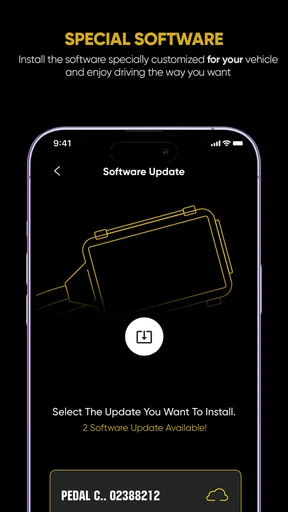
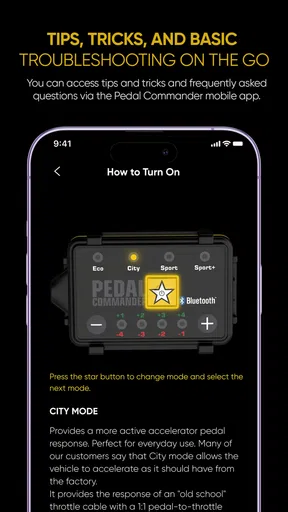
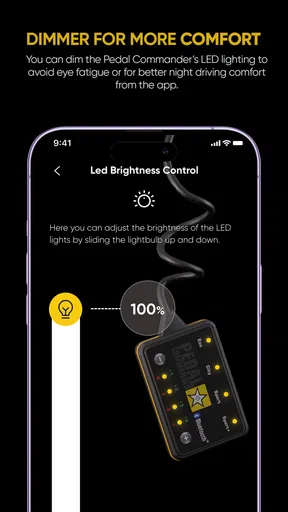
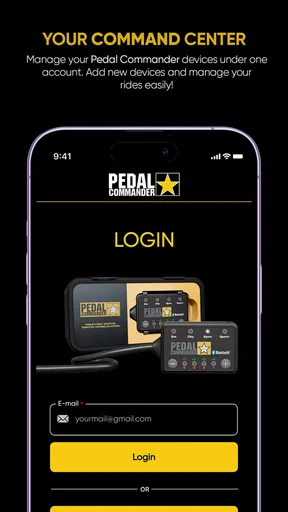
Our Review of Pedal Commander
 Analysis by Appyee
The first thing I would keep in mind about Pedal Commander is that the app is only one part of the experience: it pairs with a physical controller attached to the car. That changes how I judge its value. Installing the app is not the same as getting a complete throttle-control setup, so I’d check that the hardware is suitable for my vehicle before planning around its modes. The app is free, while in-app purchases are listed from $0.99 to $9.99 per item; those app charges should not be mistaken for the cost of the separate device.
What you get for the app’s price
For trying the software, the starting cost is appealing: there is no charge to download it, and it is rated for Everyone. The developer is VITALEN AUTO PERFORMANCE INC. The Android release is version 3.3.14 and requires Android 7.0 or later; the app is also available for iOS. It has a 3.5 average from around 680 ratings, with more than 240 written reviews, and has passed 100,000 installs. Those figures suggest a sizeable audience, but they don’t tell me whether the controller will suit a particular car or driving style.
The practical value comes from the adjustment options, not from the app being free by itself. If I already have the compatible physical unit, being able to select a response setting through Bluetooth can make the app useful during ordinary driving. If I don’t have that hardware, I would treat the free download as a way to explore the interface rather than assume I can change a car’s behavior with the phone alone. I’d also check what each optional in-app purchase covers before paying, since the listed range does not explain what an individual item unlocks.
Value depends on what you want to change
A throttle controller is best understood as a way to alter how the accelerator input feels, not as a replacement for engine tuning or a way to add power. That distinction matters. Someone who finds their car slow to react at the pedal may appreciate a sharper-feeling response, while a driver expecting more horsepower, better braking, or a different transmission will be looking in the wrong place. I’d use the settings to shape pedal feel, then judge them on comfort and predictability rather than on dramatic claims.
It also helps to think about the route, not just the mode name. A quick response setting that feels enjoyable on an open road can be tiring in stop-and-go traffic, where small pedal movements happen constantly. A softer setting may be easier to manage in a crowded parking lot or when sharing the car with someone who prefers a calmer accelerator. The useful outcome is having a choice, but the best setting is the one that makes the vehicle easier for me to drive smoothly.
How it fits into everyday driving
I’d judge its place in a daily routine by whether changing pedal feel solves a real annoyance, not by how dramatic a setting sounds. For a commute that shifts from slow traffic to open roads, I’d choose a comfortable response before setting off and keep the comparison simple on familiar routes. That practical test also helps clarify which tradeoffs matter most before deciding whether the setup is worth pursuing.
First Impressions
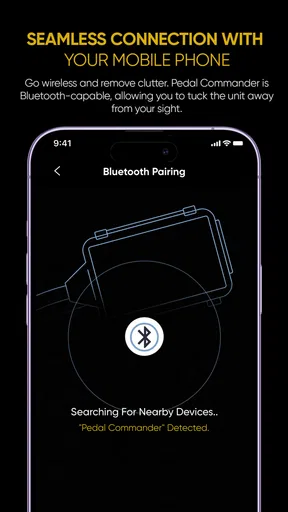
Downloading and setting up Pedal Commander was a breeze. Available for both Android and iOS, it has a straightforward interface that even the least tech-savvy among us can navigate. The app pairs with a physical device that you attach to your car, which might sound complicated, but the instructions are clear and easy to follow.
User Interface
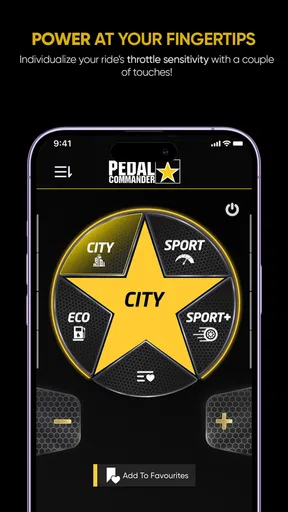
The app's UI is clean and intuitive. Once you’re set up, you’re greeted with a dashboard that gives you access to various driving modes. It’s all laid out very clearly, with big, friendly buttons that are easy to tap even when you’re on the go. There’s no unnecessary clutter, just the info you need right when you need it.
One practical habit I’d build is choosing a setting before pulling away rather than trying to browse controls while driving. That keeps attention where it belongs and gives me a fair chance to notice how the car feels on the same familiar stretch of road. If I change a setting, I’d make small, deliberate comparisons rather than jumping between extremes and trying to work out what caused the difference.
Modes and Customization
Now, let's talk about what makes this app a game-changer: the driving modes. You’ve got four main modes to choose from: Eco, City, Sport, and Sport+. Each one offers a different level of throttle response, so you can tailor your ride to your mood and the road conditions.
- Eco Mode: Perfect for those days when you’re just cruising and want to save on fuel. It tones down the throttle response, making your drive smoother and more efficient.
- City Mode: Ideal for everyday driving, offering a balance between performance and economy.
- Sport Mode: If you're in the mood for a more spirited drive, this mode makes your car feel more responsive.
- Sport+ Mode: For the thrill-seekers, this mode turns your car into a beast, with lightning-fast throttle response.
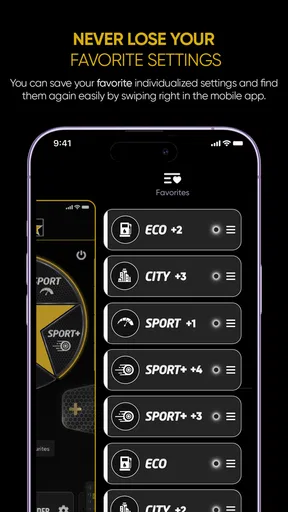
You can also fine-tune each mode with adjustments ranging from -4 to +4, giving you even more control over how your car behaves.
Making the settings useful rather than distracting
The adjustment range is most useful when I treat it as a gradual tuning exercise. I’d begin with a mild change from my usual feel, drive a familiar route, and then decide whether the pedal is easier to meter. That is more informative than choosing the most aggressive response straight away. A sharper response can make the car feel eager, but it can also make smooth low-speed movement harder if my foot is used to a softer pedal.
For example, on a weekday commute with repeated traffic lights, I’d prioritize predictable starts and easy creeping over a dramatic first impression. On a clear road, I might prefer a more responsive setting, but I’d still keep the test short and controlled. The point is not to turn every trip into a performance run; it is to find a setting that fits the conditions and that I can use consistently.
Performance on the Road
So, what’s it like on the road? In a word, transformative. Switching from Eco to Sport+ feels like switching from a Sunday drive to a racetrack. The immediate throttle response in the Sport+ mode is exhilarating. But what really surprised me was how smooth everything felt, even in the most aggressive settings.
In the Eco mode, I noticed a definite improvement in fuel efficiency, which is a huge plus in today’s world of rising gas prices. City mode is my go-to for daily commutes, as it keeps things lively without being too aggressive.
I would be careful about treating a change in pedal feel as proof of fuel savings. A milder response may encourage gentler acceleration for some drivers, but the app cannot make that outcome automatic; driving habits and conditions still matter. If economy is the main reason for considering it, I’d track my own routine over comparable trips instead of assuming a mode name guarantees a result. If I’m looking for a measured efficiency improvement, a careful driving style and vehicle maintenance may be more dependable places to start.
Choosing between a controller and familiar alternatives
Compared with simply changing how I press the accelerator, the controller offers convenient selectable response profiles, but it also adds hardware and another connection to manage. Compared with engine tuning, it has a narrower purpose: altering throttle response is not the same as changing engine output. And compared with leaving the car’s factory feel alone, it makes sense only if that feel genuinely bothers me. If I already find the pedal natural and predictable, an extra device and app may add complexity without solving a real problem.
This is why I would not recommend it to every driver who wants a livelier car. Someone seeking more power, a different sound, suspension changes, or a repair for a mechanical fault needs a different solution. The app should not be used to compensate for a vehicle that is behaving abnormally. I’d address any existing warning signs or drivability problems first, then consider a response controller only as a preference adjustment.
Connectivity and Reliability
Connectivity is rock solid. The app syncs seamlessly with the device, and I haven’t experienced any lags or drops. It’s like having a co-pilot who’s always on point. Plus, the app stays updated with regular improvements, ensuring compatibility with the latest car models and operating systems.
Since the app relies on a separate unit, the pairing and hardware fit are part of the experience, not minor setup details. Before buying anything, I’d confirm the controller works with the exact vehicle and check that the installation instructions match what I’m comfortable doing. If Bluetooth connection or phone access becomes inconvenient, the app’s easy interface matters less; I would want to understand how the system behaves when the phone is not being used before depending on it for a daily routine.
Community and Support
Another thing I love about Pedal Commander is its community. There’s a thriving user base where you can exchange tips and experiences. The support team is also very responsive and helpful, which is always a comforting backup if you ever run into issues.
In addition, the app provides a wealth of resources, including FAQs and tutorials, so you’ll never feel lost even if you’re a beginner.
For a first-time owner, I’d use those resources to answer practical questions before installation: whether the particular vehicle is supported, what the physical fitting involves, and what to do if pairing does not go as expected. Tips from other drivers can help with setup, but I would treat driving impressions as personal rather than universal. Two people can prefer different pedal responses even in similar cars, so another owner’s favorite setting is a starting point, not a recommendation I’d copy blindly.
Who is likely to get value from it?
I can see the appeal for a driver who already has the controller, understands that the change is about accelerator response, and wants a convenient way to adjust the feel for different kinds of trips. It may also suit a household where one person prefers a gentler pedal and another wants a livelier one, provided each driver selects a comfortable setting before driving. The value is less clear for someone who rarely changes preferences or who expects the app alone to deliver a noticeable upgrade.
A realistic use case is a driver who finds the factory pedal sluggish when joining a faster road but wants a calmer feel while navigating a crowded neighborhood. They could use a more responsive choice for the first situation and a less aggressive one for slow maneuvering, then settle on the setting that remains predictable. That flexibility is the strongest practical argument for the app, rather than the idea that every trip needs a sportier response.
I’d skip it if I were satisfied with the car as it is, unwilling to install or maintain the paired hardware, or hoping for a guaranteed fuel-economy gain. I’d also avoid it if I found sharper pedal response unsettling or if another driver regularly uses the car and might not expect the changed feel. In those cases, keeping the factory setup—or addressing the actual issue through a qualified mechanic—is the more sensible choice.
Final Thoughts
Overall, Pedal Commander is a fantastic app for anyone looking to enhance their driving experience. It offers a level of customization that lets you truly connect with your vehicle. Whether you’re looking to save on fuel or unleash the full potential of your car, it’s an investment that pays off every time you hit the road.
If you’re curious to try it out, you can download the app from the Google Play Store or Apple App Store and see for yourself how it transforms your drive. Happy driving!
My verdict is to consider it only after checking the vehicle fit and being honest about what I want from it. The free app gives access to the software side, while the physical controller is central to the intended setup and the optional app purchases should be checked individually. I’d recommend it to someone who wants tunable pedal feel and will take time to find a comfortable setting; I’d pass if I wanted extra horsepower, a guaranteed economy result, or a change that requires no additional hardware.
Verdict
Strengths of Pedal Commander
- Enhances throttle response significantly.
- Easy plug-and-play installation process.
- Compatible with most vehicle models.
- Four adjustable driving modes available.
- App control for convenient adjustments.
Limitations of Pedal Commander
- May void vehicle warranty for some.
- Bluetooth connectivity can be unreliable.
- Price is higher compared to competitors.
- Limited customer support options.
- Can drain battery if left on.
Similar Picks in This Category
View All
Android Auto
Google LLC4.1

maxim — order a taxi & food
PT. SITO4.7

Штрафы ГИБДД: проверка с фото
Pays LLC – Штрафы ГИБДД4.7

Номерограм – проверка авто
Авто Ассист4.8

Дром Авто
Дром4.9

Frequently Asked Questions
What is Pedal Commander and how does it work?
Pedal Commander is a throttle response controller that allows you to adjust the sensitivity of your vehicle's accelerator pedal. By modifying the throttle signal, it enhances the driving experience, providing quicker acceleration without increasing engine power. It offers multiple modes to suit different driving styles, ensuring better control and responsiveness.
Is the Pedal Commander compatible with my vehicle?
Pedal Commander is compatible with a wide range of vehicles, including various makes and models. Before purchasing, it’s crucial to check the compatibility list on the official website or contact customer support to confirm that it fits your specific vehicle model and year. This ensures optimal performance and installation ease.
Does using Pedal Commander affect my vehicle’s warranty?
Pedal Commander is a plug-and-play device, meaning it can be easily installed and removed without permanent modifications to your vehicle. However, it’s recommended to consult your vehicle’s warranty details or speak with your dealership to ensure using it won't affect your warranty, as policies can vary.
How easy is it to install the Pedal Commander?
Installing the Pedal Commander is straightforward and typically takes less than 15 minutes. It involves connecting the device between the accelerator pedal sensor and the engine control unit. The package includes a detailed installation guide, and no special tools or mechanical expertise are required, making it accessible for most users.
Can Pedal Commander improve fuel efficiency?
While Pedal Commander is designed primarily to enhance throttle response and improve driving enjoyment, it doesn’t directly improve fuel efficiency. However, by allowing more precise control over acceleration, some users may experience slight improvements in fuel economy, especially when driving in 'Eco' mode, which promotes smoother acceleration.
